Live Chat
Live chat puts a chat button on your website. Visitors write to you, and your workspace's members answer them in real time from the Chat page of the dashboard. Every chat runs through the same spam filters, workspace roles and notifications as the rest of your workspace.
Live chat is off by default. Turn it on with:
POSTA_CHAT_ENABLED=true
Create a widget
- Open Chat widgets and click New widget. Give it a name, such as Website chat.
- On the Appearance tab, set the title, the greeting, your accent colour, and which corner the button sits in.
- On the Home tab, set up the home screen visitors see first (see Home screen and menu).
- On the Settings tab, list the allowed origins: the sites that may load the widget, such as
https://example.com. Leave the list empty to allow any site. - On the Embed tab, copy the script tag.
Only owners and admins manage widgets. Editors and above answer chats; viewers can read them.
Home screen and menu
:::info Posta Enterprise The home screen, its help links and help center, and the reply time and agents in its header need a Posta Enterprise license. Without one, the widget opens straight into the chat. If a license expires, the home screen keeps showing but can't be changed until renewal. :::
A widget can open on a home screen instead of going straight into a chat. The home screen greets visitors, points them to answers on your own site, and lets them pick up earlier conversations. A tab bar at the bottom switches between three views:
- Home: a header with your greeting and a headline, then your home items in order.
- Messages: the visitor's conversations, newest first, with a count of unread replies.
- Help: a list of links to your help pages. The tab is hidden when you add no links.
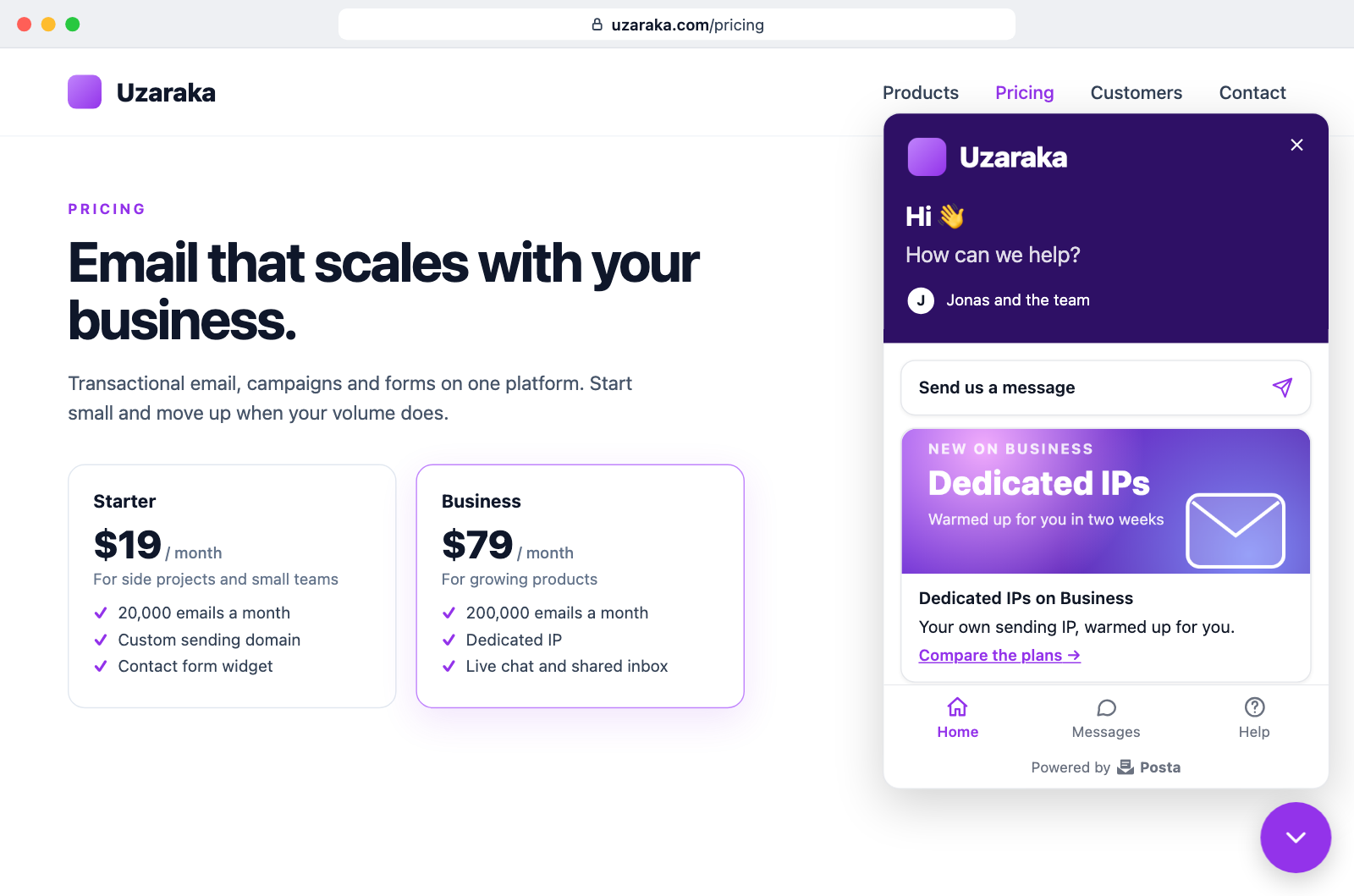
Home items come in three kinds:
| Kind | What it does |
|---|---|
| Message | Starts a chat. While the visitor has an open conversation it reads Continue the conversation and opens it. Offline, it says you'll reply by email. At most one per widget. |
| Link | A title that opens a URL. |
| Card | A title, a short text (up to 280 characters) and an optional link, for an announcement or a promotion. |
A widget can have up to 12 home items and 30 help links. Everything is plain text: Posta never renders HTML from the home screen on your page. Links must use https:, http:, mailto: or tel:. Links to other sites open in a new tab unless you turn that off; links to the page's own site stay in the tab, and the chat stays open across the page load.
The header takes your accent colour unless you pick a header colour; its text turns white or dark, whichever reads better. You can add a logo to the header and an image to each card. Images are uploaded to Posta (PNG, JPEG, GIF or WebP, up to 512 KB each) and served from Posta's own origin, so they need no other host in your Content Security Policy. Posta keeps them in blob storage when it is configured, and in its database otherwise. An image the home screen still shows cannot be deleted.
Under the headline, a status line says what to expect:
- Online, with Show the typical reply time on: Typically replies in a few minutes (or hours, or within a day), from the median time to the first reply over the last 30 days. It appears once 10 chats have been answered in that time.
- Outside business hours: We're away. Back at 09:00, or Back Monday at 09:00, in the visitor's own time zone.
- Offline within business hours: We'll reply by email.
With Show the first names of online agents on, the header also lists up to three agents who are online, as in Jane, Bob and the team. Only first names are shown, as initials and text, and only while Show visitors the name of the agent answering is on.
The greeting can hold {name}. It becomes the visitor's first name when Posta knows it, from a signed identity or a name they gave earlier, and disappears otherwise: Hi {name} 👋 reads Hi Jane 👋 or Hi 👋.
By default a visitor has one conversation at a time: writing again continues it. Turn off Visitors can have one open conversation at a time to give the Messages tab a New conversation button, so a visitor can start a separate thread for a separate question.
The Preview on the Appearance and Home tabs is the real widget, drawn from your unsaved settings, with a switch for each view and for light and dark.
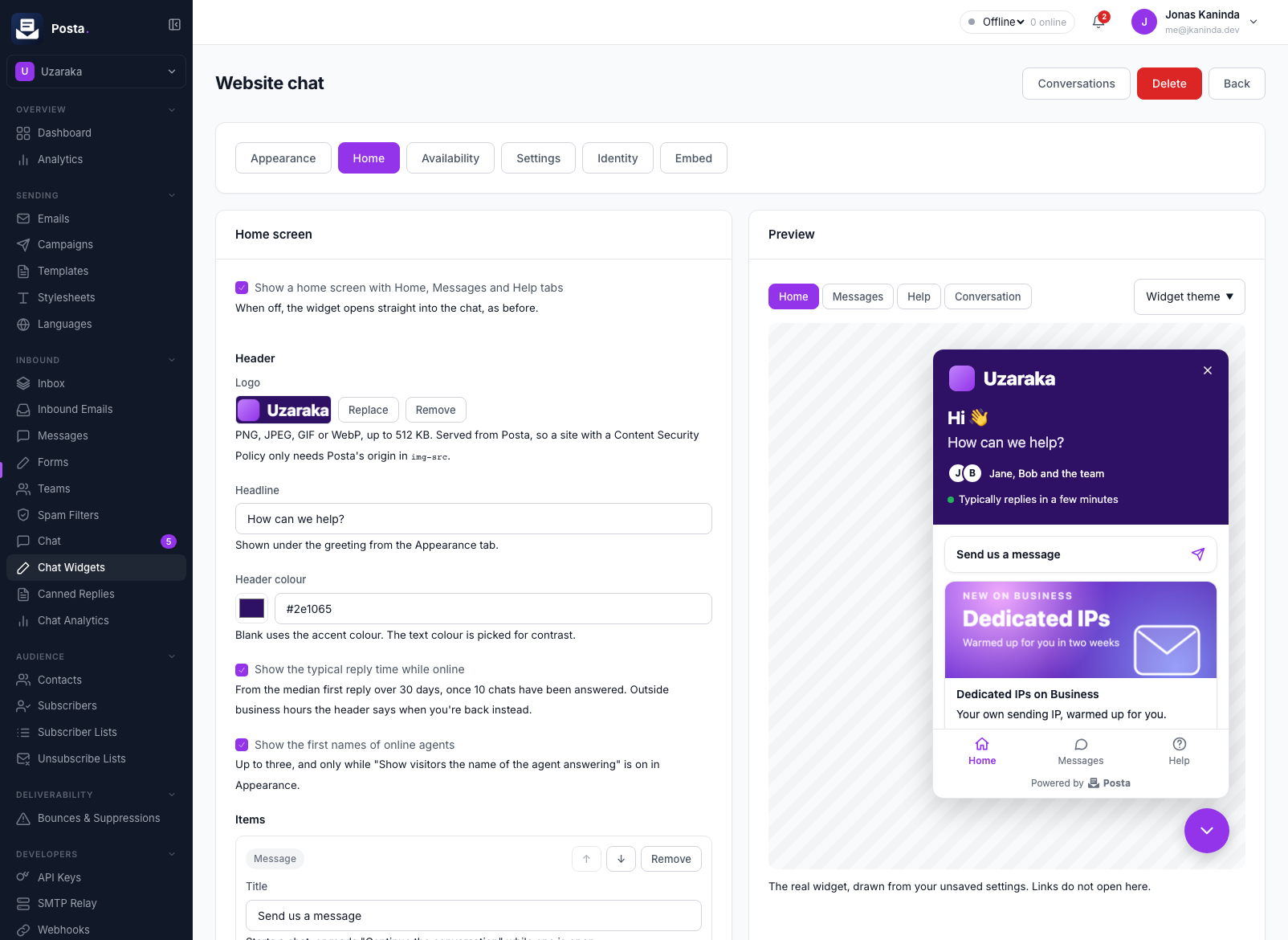
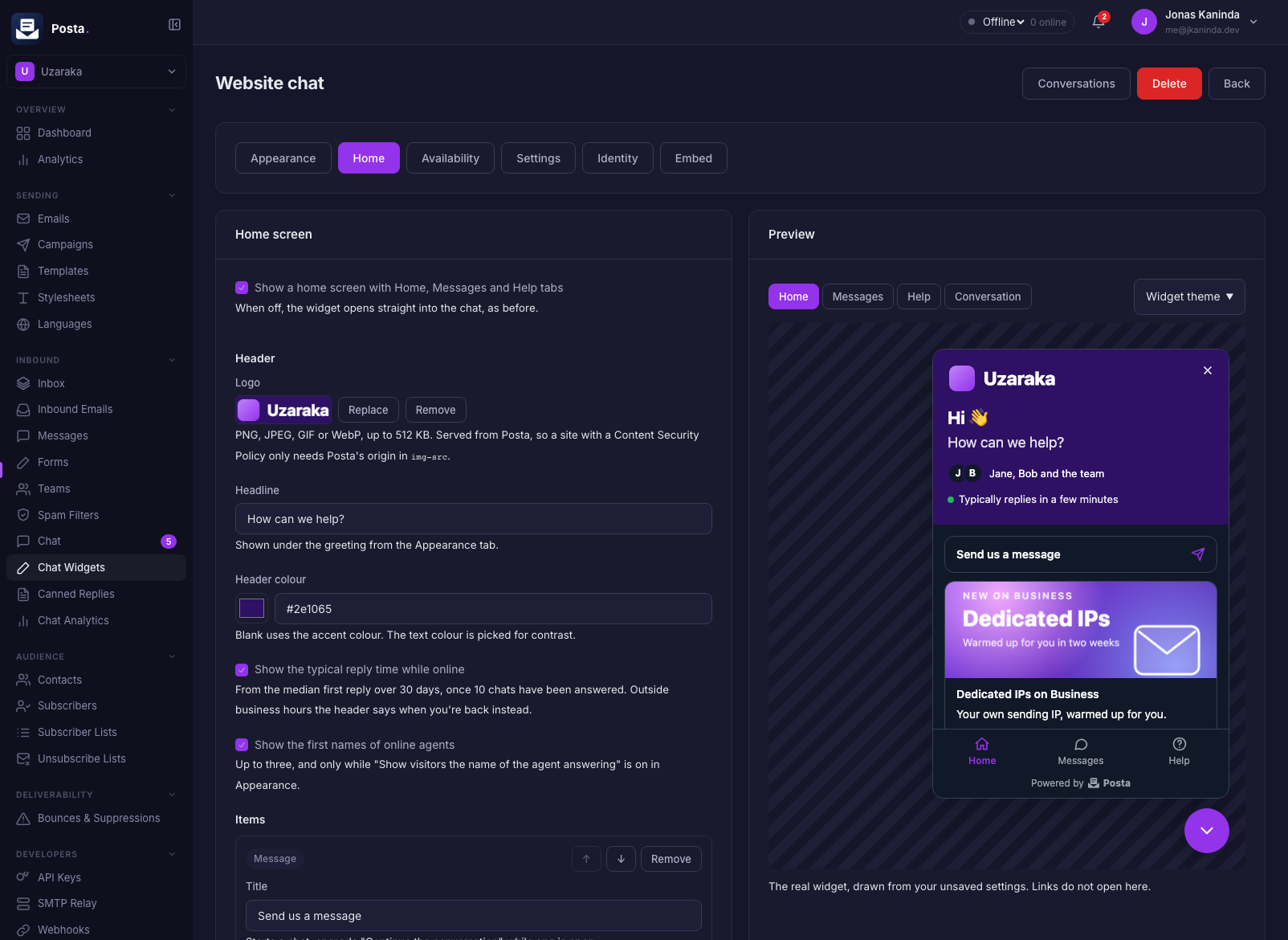
With a license, new widgets start with the home screen on and a single message item. Widgets created before the home screen existed keep opening straight into the chat until you turn it on.
When a visitor comes back with an unread reply, the button and the Messages tab show the count, and opening the panel goes straight to that conversation.
The chat button
On the Appearance tab, under Button, you can:
- add a label next to the closed button, such as Need help?;
- pick its icon: a chat bubble, a question mark or an envelope;
- move it up to 200 pixels from the side and the bottom, to clear a cookie banner or another floating button;
- hide it on phones. Links with
data-posta-chat-openandPostaChat.open()still open the chat there.
Teaser
:::info Posta Enterprise The teaser needs a Posta Enterprise license. :::
A teaser is a short message in a bubble over the closed button, such as Questions about our plans? We're here. It appears after a delay you choose, only on the pages you list (for example /pricing, or /docs/* for everything under /docs/), or on every page when the list is empty. Clicking it opens the chat. A visitor who closes it doesn't see it again in that browser until you change the text.
Home clicks
:::info Posta Enterprise Click counts need a Posta Enterprise license, like the rest of chat analytics. :::
Chat analytics lists how often each home item and help link was clicked in the period. The counts are anonymous: Posta stores the item, the widget and the day, and nothing about the visitor, their IP address or the page.
Embed it
Paste the script tag before </body> on every page that should show the chat:
<script src="https://posta.example.com/widget/v1/posta-chat.js"
        data-posta-widget="pcw_YOUR_PUBLIC_KEY" async></script>
The widget checks with Posta before it shows anything. If the widget is paused or archived, or the page's origin is not allowed, nothing appears.
The chat panel carries a small Powered by Posta link under the composer, as the form widget does.
Content Security Policy
If your site sends a Content Security Policy, allow your Posta origin for scripts and connections:
script-src  https://posta.example.com
connect-src https://posta.example.com
img-src     https://posta.example.com
img-src is only needed when the home screen shows a logo or card images.
The widget uses no eval and no inline styles on your page. Its styles live inside its own shadow root and are adopted as constructed stylesheets, so it also works under style-src 'self'.
Theming
The widget follows the visitor's light or dark system setting. To force one, set Theme to Light or Dark on the Appearance tab. The widget takes its accent colour from the widget's settings. To match your site more closely, set any of these CSS custom properties on body or another ancestor:
| Property | What it sets |
|---|---|
--posta-chat-accent, --posta-chat-accent-text | Button, header and your visitor's bubbles |
--posta-chat-bg, --posta-chat-text, --posta-chat-muted | Panel background and text |
--posta-chat-border, --posta-chat-input-bg, --posta-chat-bubble | Borders, inputs, and agent bubbles |
--posta-chat-radius, --posta-chat-font, --posta-chat-z-index | Corner radius, font, stacking order |
--posta-chat-header-bg, --posta-chat-header-text | Home screen header, over the widget's header colour |
JavaScript API
The script defines window.PostaChat:
PostaChat.open()     // open the panel
PostaChat.open('messages') // open on a view: 'home', 'messages', 'help', or 'new' for a new chat
PostaChat.close()    // close it
PostaChat.unread()   // unread agent replies, for a launcher of your own
PostaChat.hide()     // hide the button entirely
PostaChat.show()     // show it again
const off = PostaChat.on('message', (m) => console.log(m.body)) // an agent replied
PostaChat.on('open', () => {})
PostaChat.on('close', () => {})
PostaChat.on('unread', (n) => {})  // the unread count changed
A link to your page ending in #posta-chat= opens the panel when the page loads.
Any element with a data-posta-chat-open attribute opens the chat when clicked, with no script of your own. Give it a view as its value:
<a href="/contact" data-posta-chat-open="new">Contact us</a>
<a href="/help" data-posta-chat-open="help">Help</a>
Identify signed-in users
By default every visitor is anonymous, and whatever name and email they type is shown to agents as unverified. It never links them to anyone else's history, so nobody can read another person's chats by typing their address.
For users who are signed in to your site, your server can vouch for them. Generate an identity secret on the widget's Identity tab (it is shown once), keep it on your server, and sign each user:
signature = hex( HMAC-SHA256( secret, user_id + "." + lowercase(email) ) )
mac := hmac.New(sha256.New, []byte(secret))
mac.Write([]byte(userID + "." + strings.ToLower(email)))
signature := hex.EncodeToString(mac.Sum(nil))
// Node.js
const signature = require('crypto').createHmac('sha256', secret)
  .update(`${userId}.${email.toLowerCase()}`).digest('hex')
$signature = hash_hmac('sha256', $userId . '.' . strtolower($email), $secret);
signature = hmac.new(secret.encode(), f"{user_id}.{email.lower()}".encode(), hashlib.sha256).hexdigest()
Then pass it to the widget, either before the script loads or at any time after:
<script>
  window.PostaChatSettings = {
    identity: { user_id: "u_123", email: "jane@acme.com", name: "Jane", signature: "…" },
    attributes: { plan: "pro", seats: 12 }
  }
</script>
PostaChat.identify({ user_id: "u_123", email: "jane@acme.com", name: "Jane", signature: "…" })
PostaChat.setAttributes({ plan: "pro", seats: 12 })
A verified visitor's email is marked verified for agents and is matched to your workspace's contacts. The same user sees their conversation history on every device and browser they sign in from. Rotating the secret stops old signatures from verifying; those visitors carry on anonymously, without an error.
Attributes are up to 30 flat string, number or boolean values (2 KiB in all) that agents see beside the conversation. They are for context only and are not verified.
Files
Turn on attachments on the widget's Settings tab to let visitors and agents send images (PNG, JPEG, GIF, WebP) and PDFs up to 5 MB. Posta stores them in the configured blob storage; without blob storage the option has no effect. The file type is read from the file itself, not from its name. Images show in the conversation; other files download.
Availability
The widget is online when at least one agent is online and the time is inside the widget's business hours (set on the Availability tab; no hours means always).
Agents set themselves Online, Away or Offline from the dashboard. Only editors and above count. The dashboard keeps an agent online while it is open; an agent whose dashboard has been closed for about a minute counts as offline, so the widget never looks staffed when nobody is there.
When the widget is offline it either:
- takes messages: visitors see the offline greeting and must give their email before writing; or
- hides: the chat button does not appear.
With Hide the widget chosen for when no one is available, a widget with a home screen stays visible to visitors who already have a conversation, so they can read your replies and answer them. It hides for everyone else, and no one can start a new chat until you are back. A widget without a home screen hides for everyone, as before.
When a visitor leaves
If a visitor closes the page and does not come back within two minutes, agents' replies go to them by email, provided they gave an email address and the widget has a reply sender on one of your verified domains. A dashboard banner says when this will happen.
Posta waits a minute after an agent's last message and sends one email with every message the visitor has not seen, as the agent who wrote it, through the same delivery, suppression list and email log as the rest of your mail. If the visitor comes back first, nothing is sent. Nothing a visitor does can make Posta send an email.
The email links back to the page with the chat open; the same browser picks the conversation up where it left off. With an inbound domain configured (see configuration), the visitor can also simply reply to the email, and the answer appears in the conversation marked via email.
Answering chats
The Chat page lists conversations under Open, Mine, Unassigned and Closed. New chats appear at once, with a notification in the dashboard. When no agent is online, owners and admins get an email instead. A visitor's message that waits more than five minutes (POSTA_CHAT_UNANSWERED_MINUTES) emails the assignee, or the owners and admins if nobody is assigned, at most once an hour per conversation. Each member can turn these emails off under Settings → Notifications → Live chat.
Both sides see when the other is typing, and visitors see Seen once an agent has read their message.
- Canned replies: type
/in the composer to insert a saved answer. Manage them under Chat → Canned replies. - Auto-assign (Posta Enterprise): turn it on for a widget to give each new conversation to the next online agent in turn. Set a cap to skip agents who already hold that many open conversations. Without a license, agents claim conversations themselves; if a license expires, auto-assign keeps running but its settings can't be changed until renewal.
- Visitor details: beside each conversation, agents see the visitor's verified or unverified email, attributes, their earlier conversations, and the matching contact.
- Analytics (Posta Enterprise): Chat → Analytics shows conversations per day, median and average time to first response and to resolution, and how many conversations are still unanswered.
Replying to an unassigned conversation assigns it to you. You can also assign it, close it, or mark it as spam from the thread. A visitor who writes again in a closed conversation reopens it.
Messages are plain text on both sides. Links to http, https and mailto addresses become clickable; nothing a visitor types is ever rendered as HTML.
The name and email a visitor types are shown to you but not verified. Posta never uses them to link a visitor to anyone else's history.
Inbox
The Inbox lists form messages, inbound emails and chats together, newest activity first, with filters for open, mine, unassigned and closed. Each row opens in its own view. Inbound emails that became a reply on a form thread or a chat appear only there.
Webhooks
Subscribe a webhook to live chat events:
| Event | Fires when |
|---|---|
chat.conversation.started | A visitor starts a chat and the first message passes scanning |
chat.message.created | A visitor or an agent sends a message, including a visitor's emailed answer |
chat.conversation.assigned | A chat's assignee changes, including auto-assign and an agent's first reply |
chat.conversation.closed | A chat is closed |
Each payload carries the conversation (with its visitor, whose email_verified is true only for a signed identity) and, for message events, the message. Typing, read receipts and presence are not webhook events. Webhooks are sent in the background, so a slow receiver never delays a chat.
Spam and abuse
- A visitor's first message goes through spam scanning, including your workspace-wide spam filters. A quarantined conversation stays out of the dashboard list (the API returns it with
?quarantined=true) and notifies no one; a rejected one is not stored at all. - Later messages are scored on content only (your filters, links, markup). A message the scan rejects is dropped without telling the sender; the third one marks the conversation as spam, which takes it out of the default lists.
- A spam filter can apply to every form and chat in the workspace, or to one chat widget only.
- Ban a visitor from a conversation to mark it as spam, drop anything more they send (they are not told), and block their IP from starting chats in the workspace for 24 hours. Lift ban undoes it.
- Each widget only answers its allowed origins. Requests without an
Originheader are refused by default, since the widget only runs in browsers. Like any public key, this slows copycats down; it is not authentication. - Posta limits each IP to 5 new conversations an hour, each visitor to 30 messages a minute and 500 a day, each conversation to 60 messages a minute, and each workspace to 2,000 new conversations a day.
Running it
Messages are stored in PostgreSQL and announced through Redis, so live chat works across any number of server replicas: a visitor connected to one replica and an agent on another see each other's messages at once. A replica that restarts mid-chat loses nothing; both sides pick up from the last message they saw when they reconnect.
The widget and the dashboard keep a server-sent events stream open while a chat is active. Behind a reverse proxy, turn off response buffering and allow long reads for these paths:
location ~ ^/api/v1/(chat/.+/stream|workspaces/current/chat-stream) {
    proxy_pass http://posta;
    proxy_buffering off;
    proxy_read_timeout 120s;
}
Posta sends a keep-alive every 25 seconds.
With POSTA_PLAN_ENFORCEMENT on, a workspace's plan can limit its chat widgets, the agents online at once, and the conversations started per calendar month. Past the monthly limit, the widget behaves as offline: visitors still leave a message and get the answer by email; nothing is dropped. Each server process holds up to POSTA_CHAT_MAX_STREAMS visitor streams; past that, widgets poll every 10 seconds until a slot frees up.
Retention and erasure
Closed and spam conversations are erased, with their messages and files, POSTA_CHAT_RETENTION_DAYS (365 by default) after their last message; a widget can keep them for less on its Settings tab. Visitors left with no conversations go too, and a visitor's IP address is cut to its network (/24 for IPv4, /48 for IPv6) once they have not been seen for 30 days.
For a data subject's request, owners and admins can:
- delete one conversation from its thread, now and for good;
- export every chat of a person by the email they gave (
POST /api/v1/workspaces/current/gdpr/export-chats), as JSON; - delete every chat of a person by that email (
POST /api/v1/workspaces/current/gdpr/delete-chats).
These match typed and verified emails alike, since both are personal data.
Privacy
The widget sets no cookies. It stores one entry in the visitor's browser, localStorage key posta_chat_<your widget key>, holding the visitor's chat token and their open conversation, so the chat survives page loads. With the home screen on, it also keeps the last view in sessionStorage, which the browser clears when the tab closes. List it in your privacy notice if you disclose browser storage.
Posta keeps a visitor's IP address and user agent with their chat, for abuse handling. Only a hash of the visitor's token is stored.